



















Building a Network That Doesn’t Exist: Inside the MDR Log Simulator
By Jay Young, Sr. Splunk Consultant
Every detection engineer eventually hits the same wall. You write a correlation search, you tune a risk rule, you build a MITRE-aligned dashboard — and then you need data to prove any of it actually works. Real production logs are messy, sensitive, and impossible to share. Canned sample files are static and obvious. And the moment you want to test an attack technique, you either have to detonate something in a lab or hand-edit a log line and hope it parses.
I built the MDR Log Simulator to make that wall disappear. It’s a Docker-deployed platform that stands up an entire synthetic enterprise — users, laptops, servers, firewalls, cloud tenants, identity providers — and streams their telemetry into Splunk in each vendor’s real, native log format. Not a generic JSON blob with a vendor field tacked on. The actual on-the-wire shape that a Palo Alto firewall, a Windows domain controller, or AWS CloudTrail would emit.
This post walks through the three pieces I’m proudest of: the Ambient Scheduler (the engine that makes the fake company behave like a real one), the Add-ons library (Splunk-ready CIM parsing for everything it produces), and Threat Mapping (turning that clean baseline into MITRE ATT&CK and AI-attack test cases on demand).
The core idea: a directory, not a data generator
Most log generators are random-line factories. They pick a username from a faker list, a random IP, a random hostname, and emit an event. The problem is that randomness is a tell. Real organizations have shape: a finite roster of people, each tied to a specific laptop, in a specific office, in a specific department, doing a specific job. The same person shows up in the VPN logs, the Windows logon events, the firewall traffic, and the Okta sign-ins — and it’s the same person every time, with the same hostname and the same IP range.
So the simulator starts from a directory, not a generator. It models:
- 150 user identities — each with a name, department, role, location, and an activity profile
- 133 assets — laptops, servers, and network devices, each bound to an owner and an operating system
Every event the platform produces is pinned to a real entity from that directory. When kmurphy authenticates, it’s her laptop, her office IP, her department in the event. That coherence is what makes the data hold up under a SOC analyst’s gaze instead of falling apart on the first | stats count by user.
1. The Ambient Scheduler — making the company behave
A directory of 150 people is just a spreadsheet until something makes them act like employees. That’s the Ambient Scheduler. It’s the clean, directory-bound baseline engine, and its whole job is to answer one question every second of the simulated day: who is online right now, and what would they realistically be doing?

The Ambient Scheduler running, showing live online/offline status across the directory
Here’s what’s happening under the hood:
A real daily lifecycle. People don’t log in 200 times an hour. They arrive in the morning, work, go quiet at lunch, come back in the afternoon, and log off at the end of the day. The scheduler gives every user a deterministic daily plan — login AM → out at lunch → in PM → out EOD — and goes quiet overnight. Servers and service accounts stay online 24/7. In the screenshot above you can see the live online/offline column tracking each entity against its own local time, because a user in San Francisco and one in London aren’t at their desks at the same moment.
Personas drive the schedule. A rule-based persona engine assigns each entity a working pattern without me having to hand-edit any config:
- standard — Monday-to-Friday office worker
- evening_tail — executives who stay late and check in on weekends
- on_call — security staff with late-night incident windows
- always_on — service accounts that never sleep
Activity profiles create real-world skew. If all 150 users emitted identical volume, every behavioral analytics rule in Enterprise Security would flag the entire company as an outlier — because uniformity is the anomaly. So each user is weighted: heavy hitters (developers, SREs, help desk) generate far more telemetry than light users (executives, sales) or dormant accounts. The result is a natural Pareto distribution — a top-to-bottom ratio of roughly 100:1 — exactly like real traffic.
A rhythm engine handles the timing. Rather than a flat events-per-second firehose, the scheduler samples inter-arrival times from a Poisson process whose rate rises and falls by hour of day, weekday vs. weekend, holidays, and even Patch Tuesday. The traffic breathes.
The status bar across the top — events fired, online now, offline, users, assets — updates live every five seconds, so you’re watching a synthetic workday unfold in real time. Hit Stop and the whole company goes home.
One rule I hold to religiously here: the ambient baseline is 100% clean. No threats, ever, leak into the baseline generators. The entire point is to have a believable “normal” so that anything malicious stands out for the right reasons. Threats only enter through deliberate injection — which brings us to the third feature. But first, the layer that makes all of this land in Splunk correctly.
2. Add-ons — native formats, CIM-compliant, Splunk-ready
Generating realistic events is only half the battle. They have to parse. A Windows logon event isn’t useful if Splunk can’t pull EventCode and TargetUserName out of it; a firewall log isn’t useful if it doesn’t normalize into the Network Traffic data model. So every data source the simulator produces ships with a matching Technology Add-on — props, transforms, eventtypes, and tags — pre-built for Splunk and the Common Information Model.

The Add-ons library — 32 installed Technology Add-ons spanning 16 CIM data models and 77+ sourcetypes
There are 32 add-ons installed, covering 16 CIM data models and 77+ sourcetypes, organized by category — Security, Endpoint, Cloud, Identity, Network, and System. Click into any one and you can see exactly what it normalizes:

Add-on detail: Palo Alto Networks mapping to Network_Traffic, Intrusion_Detection, and Web data models
Each add-on declares its CIM data models, its sourcetypes, and its config files, and you can download the .tgz bundle or jump straight into Splunk to inspect it. The coverage spans the tools a real MDR shop actually watches: Palo Alto, Fortinet, Check Point, and Cisco ASA on the firewall side; CrowdStrike, Microsoft Defender, SentinelOne, and Sophos for endpoint; AWS CloudTrail, Azure, and Office 365 in the cloud; Okta, Duo, and Azure AD for identity; plus Windows, Linux, DNS, and email.
This is the part I refuse to fake
Here’s the principle that governs the whole project: I do not “improve” a log provider away from how the vendor actually emits it. Field names, delimiters, and structures match the official vendor documentation. That means each source comes out in its own native format, not a homogenized one. Here’s what actually lands on disk:
Palo Alto Networks — native comma-delimited CSV:
2026/06/01 22:00:56,007054000012345,CONFIG,2026/06/01 22:00:56,PA-3220-FW01,vsys1,set network interface ethernet,pgray,Web,Succeeded,…
Check Point — native `key:value` syslog:
time:1781317589 action:Accept src:10.41.201.250 dst:149.17.216.200 proto:1 service:ftp rule_name:Rule_857 product:”VPN-1 & FireWall-1″ origin:10.41.x.x
Cisco ASA — native syslog with message IDs:
Jun 12 21:25:20 SWITCH-ACCESS-SF-01 %ASA-6-302014: Teardown TCP connection 211332 for inside:172.22.122.197/61958 to outside:65.14.193.30/443 duration 00:13:22 bytes 3760285
Windows Security — native XmlWinEventLog:
<Event xmlns="http://schemas.microsoft.com/win/2004/08/events/event"><System>
  <Provider Name="Microsoft-Windows-Security-Auditing" Guid="{54849625-...}"/>
  <EventID>4624</EventID><Channel>Security</Channel>
  <Computer>LAPTOP-JBARNES</Computer>
  <Security UserID="S-1-5-21-1200955418-6691640362-2225174538-4050"/>
</System>...</Event>
AWS CloudTrail — native JSON API records:
{"eventTime":"2026-06-13T02:25:13Z","eventSource":"ec2.amazonaws.com",
 "eventName":"DescribeInstances","eventType":"AwsApiCall",
 "recipientAccountId":"422105323269","requestParameters":{...}}
Five different sources, five genuinely different formats — CSV, key:value syslog, message-ID syslog, XML, and JSON — exactly as each vendor ships them. A single generator engine renders each provider through its own native renderer and routes it to a file whose name matches the Splunk monitor stanza, so a forwarder picks it up under the correct sourcetype with zero special-casing.
And look closely at the coherence: that Cisco switch is SWITCH-ACCESS-SF-01 (San Francisco — matching its owner’s location), the Windows event names a real fleet host LAPTOP-JBARNES, and the Palo Alto config change is attributed to the real user pgray. The directory binding I described earlier flows all the way through to the raw event. There are no DESKTOP-XXXX faker placeholders to give the game away.
3. Threat Mapping — turning a clean network into test cases
A perfectly clean baseline is exactly what you want — until you need to prove your detections fire. The Threat Mapping page is where I turn the lights off and let something prowl the network. It connects every data source the simulator produces to the MITRE ATT&CK techniques and AI cyber attacks that source is capable of detecting, and lets me inject any of them on demand.
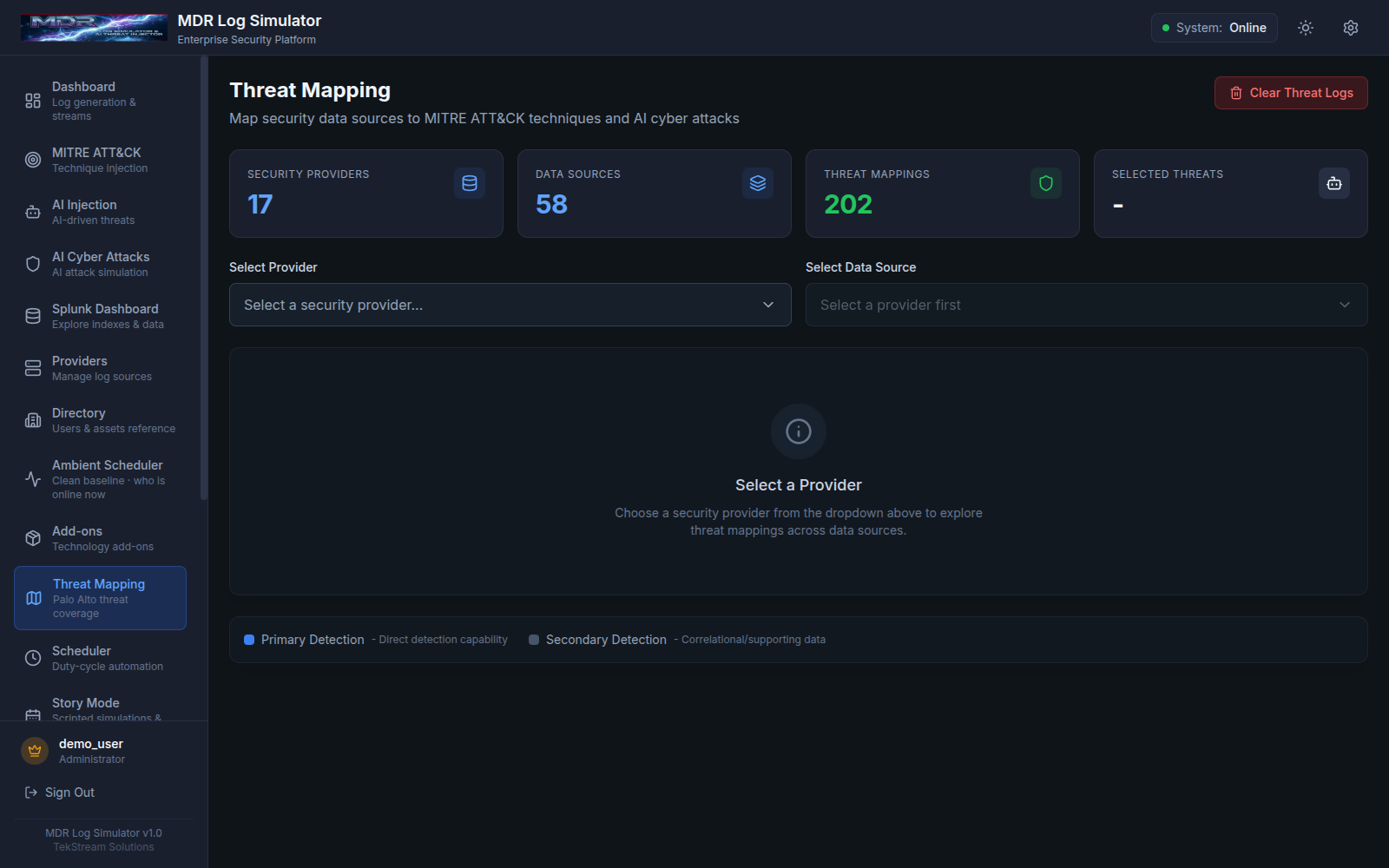
Threat Mapping overview — 17 providers, 58 data sources, 202 threat mappings
The numbers up top tell the story: 17 security providers, 58 data sources, and 202 threat mappings between them. Pick a provider and a data source, and the page shows you precisely which techniques that telemetry can surface:

Palo Alto threat logs mapped to MITRE techniques like T1190, T1203, T1566, and T1210
Here I’ve selected Palo Alto Networks → Threat Logs (`pan:threat`), which maps into the Network Traffic data model, and the grid lays out the relevant ATT&CK techniques — T1190 Exploit Public-Facing Application, T1203 Exploitation for Client Execution, T1566 Phishing, T1189 Drive-by Compromise, T1210 Exploitation of Remote Services, T1046 Network Service Discovery — alongside the AI-attack category. Each mapping is graded Primary (this source directly detects the technique) or Secondary (correlational, supporting evidence), so I know what kind of signal to expect before I inject anything.
Every card has an inject button. Click it, and the platform writes threat-bearing events into the matching native log stream — in the correct format, pinned to a real host and user from the directory, just like the baseline. From Splunk’s perspective there’s no seam: the malicious activity arrives under the same sourcetype, through the same forwarder, as everything else. That’s the whole point. A detection that fires on these injected events is a detection that will fire in production.
And when I’m done testing, Clear Threat Logs wipes the injected events and returns the environment to its pristine baseline, ready for the next experiment.
Why it all works: one coherent world
The thing I want to leave you with is that none of these three features stands alone. They’re three views of a single, coherent synthetic organization:
- The directory defines who exists — 150 people, 133 machines, each with a real identity.
- The Ambient Scheduler makes them behave — realistic daily rhythms, weighted activity, persona-driven schedules, all bound to the directory.
- The Add-ons make their telemetry land correctly — native vendor formats in, CIM-normalized data models out.
- Threat Mapping drops real adversary behavior into that clean world, in the same formats and bound to the same entities, so detections get an honest test.
The result is a network that doesn’t exist but is indistinguishable, at the sourcetype and CIM level, from one that does. I can stand up a believable enterprise, watch a workday breathe through Splunk, inject a phishing campaign or a public-facing exploit, confirm my correlation searches and risk rules light up, wipe it clean, and do it all again before lunch — without a single real endpoint, a single byte of sensitive data, or a single line of hand-edited log.
That’s the wall, gone.
The MDR Log Simulator runs as a Docker deployment — a React frontend on port 6970, a FastAPI backend on 6971 — streaming native-format logs to a host directory that Splunk monitors directly.
About the Author
Jay Young has been involved in Information Technology for 33 years, working with Internet and Agriculture technologies. For 15 years, he worked with and designed Oracle Databases nationally and internationally. Jay has held IT management and development roles. For the last six years, he has focused his expertise on Splunk, Splunk Cloud, AWS, Data Onboarding, and Enterprise Security. Jay holds a bachelor’s degree in computer information systems and earned top Splunk certifications: Splunk Core Consultant (Recertified Oct 2023), Admin, and Architect. He also has accreditations in Enterprise Security. Jay currently resides in Abilene, Texas.