






















You’ve Changed, Man! Using Stream Stats and For Each To Track Changing Splunk Fields
By Eric Levy, Senior Splunk Consultant and Marvin Martinez, Team Lead
If there’s one thing you should know about Splunk, their SPL (Search Processing Language) often makes the impossible possible. In a recent use case, my colleague Marvin Martinez and I needed to audit changes to an artifact event and know exactly which fields changed at what time. Sadly, Splunk events aren’t indexed in array form and, thus, there’s no explicit visibility to directly compare consecutive events. However, if you put the data in a table in the sequence you want and use the magic of | streamstats and a few | foreach commands, you can output exactly which fields changed between events, and when they changed!
TUTORIAL
For this example, we use three generated fields to exemplify three use cases.
Our first field, “field1”, will exemplify a field that changes between three events. The value of field1 will be different for each event. Thus, we should expect to see it for all of our results.
Our second field, “field2”, will exemplify a field that becomes null and is later set to another value. Thus, we should expect to see it be set to a value in the first event, null in the second event, and not null in the third event.
Our third field, “field3”, will exemplify a field that does not change across the entire span of events. Thus, we will see it in the first event, but not the other two events.
Using some generative SPL, this is what our data looks like:

At this point, the instructions are pertinent for transforming raw events using this command.
Start by tabling out the fields you care about and use a fillnull value of “THIS_IS_NULL” to give null values something to pass into later comparisons (otherwise, you will receive an error).
| table [YOUR FIELDS HERE]
| fillnull value=THIS_IS_NULL

THE FOREACH COMMAND
Similar to a for-loop in coding, the | foreach command iterates through all values of a specified Splunk field. You start by invoking the command, listing the field, and referring to the field using the <<FIELD>> syntax within actions enclosed in brackets.
As a simple example, if I had a field named “index” that appeared in ten events, I can tell Splunk to increment each value of “index” by 1 over all events as follows:
| foreach index [<<FIELD>> = <<FIELD>> + 1]
Now, back to the tutorial!
We use the foreach command to first ensure we correlate the field name to the field value.
| foreach * [ eval <<FIELD>> = “<<FIELD>> = ” . <<FIELD>> ]
Putting <<FIELD>> in quotes allows us to return the field name, whereas <<FIELD>> outside of quotes on the other side of the equals sign returns the actual value for each field.

Now that we have a chronological history of the field values, we can leverage streamstats to gather the previous value of each field in order to compare and determine if the field had changed at all. Streamstats is very powerful as it allows you to execute stats-like calculations and grouping without transforming your data set.
To achieve this, we use the SPL line below, using the last() function, in conjunction with the “current=f” (to not count the current value in the stats calculation), to grab the previously seen field value. We prefix the output fields with “last_” so we can easily reference them in our downstream SPL lines and not overwrite the original field or have them named something that won’t be easily referenced.
| streamstats current=f window=1 last(*) as last_*
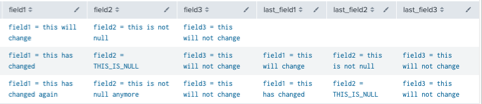
Run another foreach command that uses the mvappend function to put the previous and current field values in a single field, then get rid of the “last_*” fields from the table.
| foreach * [eval <<FIELD>> = mvappend(<<FIELD>>, last_<<FIELD>>)]
| fields – last_*
The next line of SPL is the core of this tutorial. By this point, our fields host a multivalue field that recognizes the original field for that event at index 0, and the previous field at index 1. As such, we use a foreach that nulls out fields where the two values are the exact same, and if not, replaces the value with the original field. We can access individual values in a multivalue field using the mvindex() function.
| foreach * [eval <<FIELD>> = if(mvindex(<<FIELD>>, 0) = mvindex(<<FIELD>>, 1), null(), mvindex(<<FIELD>>, 0))]

Now, let’s make our null values look a bit nicer by formatting our null values appropriately:
| foreach * [eval <<FIELD>> = if(match(<<FIELD>>, “THIS_IS_NULL”) OR match(<<FIELD>>, “=\snull”), “<<FIELD>> = null”, <<FIELD>>)]

Finally, while optional depending on how you want to format the events, iterate through the events one more time to add them to a new multivalue field, remove any duplicate field attributes within your events (not applicable to this example, but can happen) and re-format your fields appropriately to look like this:
| eval fields = mvdedup(fields)
| fields fields
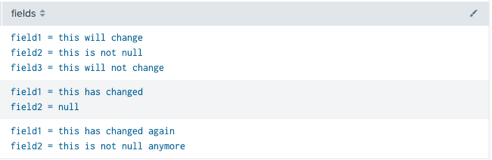
We can conclude that field1 and field2 changed values through all three events, while field3 remained the same. Additionally, our search caught that field2 became null and then set to another value.
Thanks to this SPL, we can determine which fields have changed over an event. Here is the complete query, including the generative set-up commands:
| makeresults
| eval field1=”this will change”
| eval field3=”this will not change”
| append [| makeresults | eval field1 = “this has changed” | eval field2=”this is not null” | eval field3=”this will not change”]
| append [| makeresults | eval field1 = “this has changed again” | eval field2=”this is not null anymore” | eval field3=”this will not change”]
| fillnull value=THIS_IS_NULL
| table *
| foreach * [ eval <<FIELD>> = “<<FIELD>> = ” . <<FIELD>> ]
| streamstats current=f window=1 last(*) as last_*
| foreach * [eval <<FIELD>> = mvappend(<<FIELD>>, last_<<FIELD>>)]
| fields – last_*
| foreach * [eval <<FIELD>> = if(mvindex(<<FIELD>>, 0) = mvindex(<<FIELD>>, 1), null(), mvindex(<<FIELD>>, 0))]
| foreach * [eval <<FIELD>> = if(match(<<FIELD>>, “THIS_IS_NULL”) OR match(<<FIELD>>, “=\snull”), “<<FIELD>> = null”, <<FIELD>>)]
| foreach * [eval fields = mvappend(fields,<<FIELD>>)]
| eval fields = mvdedup(fields)
| fields fields
Happy Splunking!
About the Authors
Eric Levy is a Splunk Core Certified Consultant who joined the TekStream team in July 2022. Eric’s background and eagerness to learn makes him excited to unlock the data possibilities Splunk has to offer its clients. Eric’s portfolio of projects makes him well adapted to time management and a diverse array of technical situations and has since expanded his horizons into Enterprise Security engagements as well as a full-time member of the IRS Splunk team. Eric resides in Arlington, Virginia and is a proud Virginia Tech graduate. In his free time, he continues to pursue his love of music.
Marvin Martinez has nearly 20 years of combined experience in software and workflow development and nearly 5 years as a Splunk Core Certified Consultant and certified SOAR developer, most recently operating as a team lead on the MDR (Managed Detection and Recovery) team and leading a team of SOAR developers to architect, administer, design, develop and enhance automation playbooks and activities as part of the incident resolution process with Splunk SOAR. For the first 15 years of his career, he was primarily focused on Inspyrus Invoice Automation installation, design and configuration, including PL/SQL, Workflow Forms Recognition (WFR), Oracle Enterprise Capture, EBS/JDE/Fusion integration, and BPEL/BPM development, as well as working within and managing Oracle Cloud Infrastructure (OCI) and ancillary BPEL/BPM development and becoming a certified OCI Architect Associate and AWS Developer Associate. Marvin has a proven track record of being motivated, technologically agile, quick and eager to learn, efficiently productive, and an effective communicator, able to work proficiently as part of a team as well as independently/remotely.