



















AWS Data ingestion with Splunk. What if we can’t use Kinesis Firehose?
By Tyler Phillips, Sr. Splunk Consultant
So I have a customer that isn’t allowed to use Kinesis firehose to ingest AWS CloudWatch data into Splunk. What? But… that’s how we do that ingest for the best performance. (We also have a blog about that setup. https://www.tekstream.com/splunk/how-to-connect-aws-and-splunk-to-ingest-log-data/)
Since Kinesis Firehose was off the table, we needed something that could distribute the load — and that’s where SQS queues came in. We have a bunch of AWS data we need to ingest from CloudWatch stored in S3. Using the Splunk Add-on for Amazon Web Services (https://splunkbase.splunk.com/app/1876) we have many out of the box options for ingestion.
Of course, we could just use the CloudWatch input or S3 input, but we had a lot of data to ingest, and we didn’t think one heavy forwarder would keep up. So, we instead used SQS queues to be able to spread out the load across multiple Heavy Forwarders.
SQS queues use a system where, when we make the call to retrieve the data, it clears it out of the queue and prevents it from being ingested elsewhere. So, after one heavy forwarder reaches out to the queue it will grab the data; when the next heavy forwarder reaches out it will only see newer data if it is present.
This also provides two other benefits. If we offset each HF input by a minute or two each running every 5 minutes, we could pull on a faster cadence as well with fewer calls per each heavy forwarder. This will help provide a more stable and consistent data feed for monitoring which is our use case as well.
We’re also building a redundant ingestion environment so we can lose a heavy forwarder or ingestion input and still get our data since its spread out across other forwarders. Lose a heavy forwarder? The others pick up the slack while you fix it.
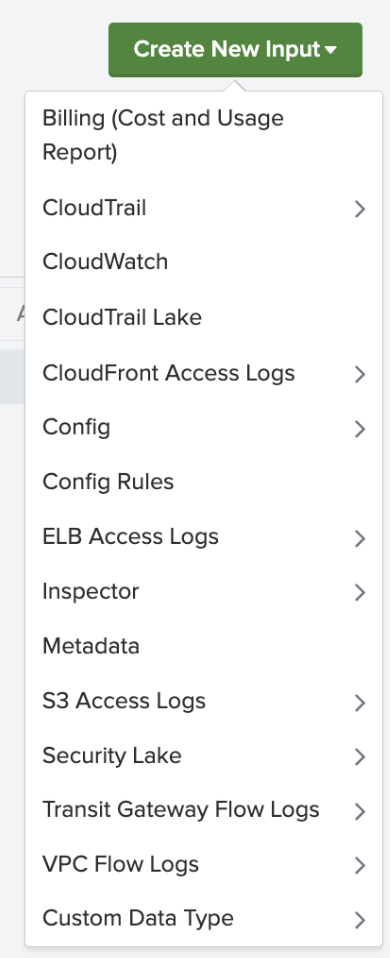
With this we can set it up by clicking “Custom Data Type” > “SQS based S3”> Enter your credentials provided in the configuration tab and index and source type. Assuming you have your SQS queue set up on AWS, you should now be collecting AWS CloudWatch data into Splunk.
You can also use sub account IAM roles to reach into connected accounts to gather data from other places within your AWS environment if needed.
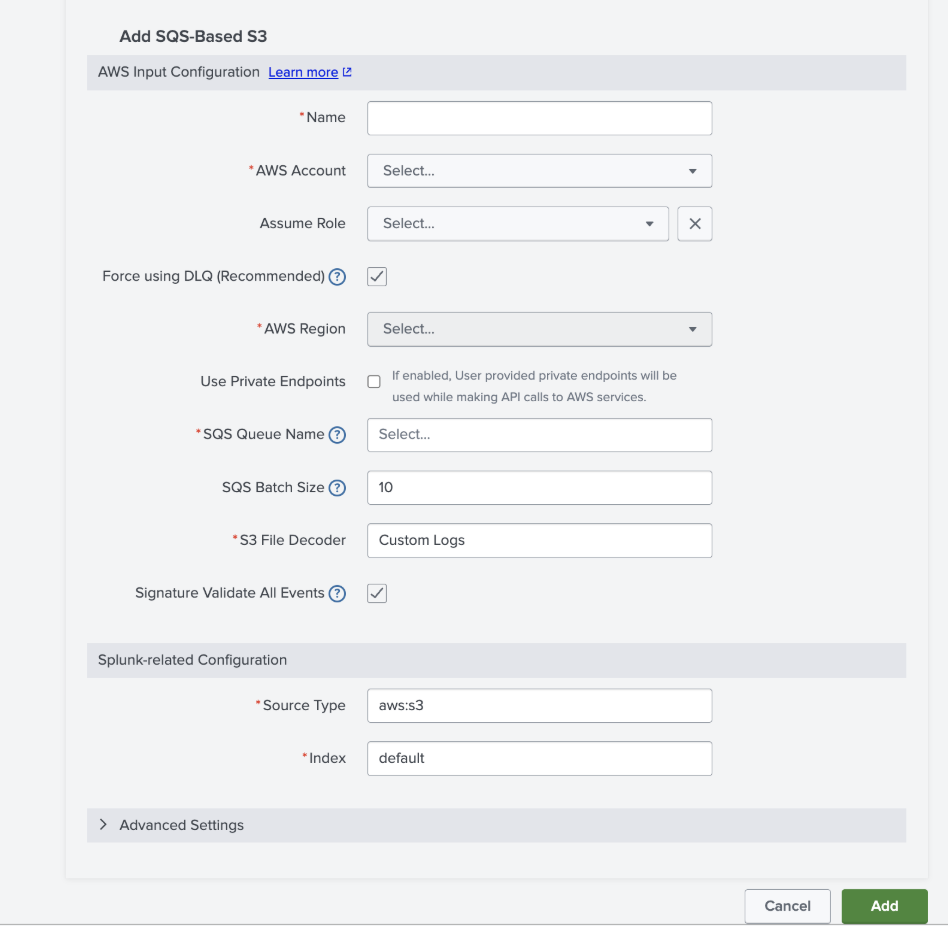
We spread this set up over multiple heavy forwarders and ingestion is working great since we used the source type already built in with the TA as well! Our customer got what they needed, Kinesis Firehose or not. A redundant, smooth-running, lightweight solution for collecting this data without the use of Kinesis Firehose.
About the Author
Tyler Phillips is a Splunk Consultant with a Splunk Core Certified Consultant certification. Tyler is also Splunk IT Service Intelligence Certified Admin accredited along with his Splunk Cloud accreditations. Tyler current learning goal is to receive the Splunk O11y Cloud Certified Metrics User Certification. Tyler has worked on projects customizing Splunk dashboards, Splunk ITSI, TrackMe, and upgrading Splunk environments to 9.x. He has gained experience with a multitude of Splunk items through the Splunk ODS service. In this service, Tyler has learned the ins and outs of troubleshooting and has gained valuable experience in Splunk problem solving. Tyler resides in Georgia and has received his Information Technology degree from Georgia Southern University.